
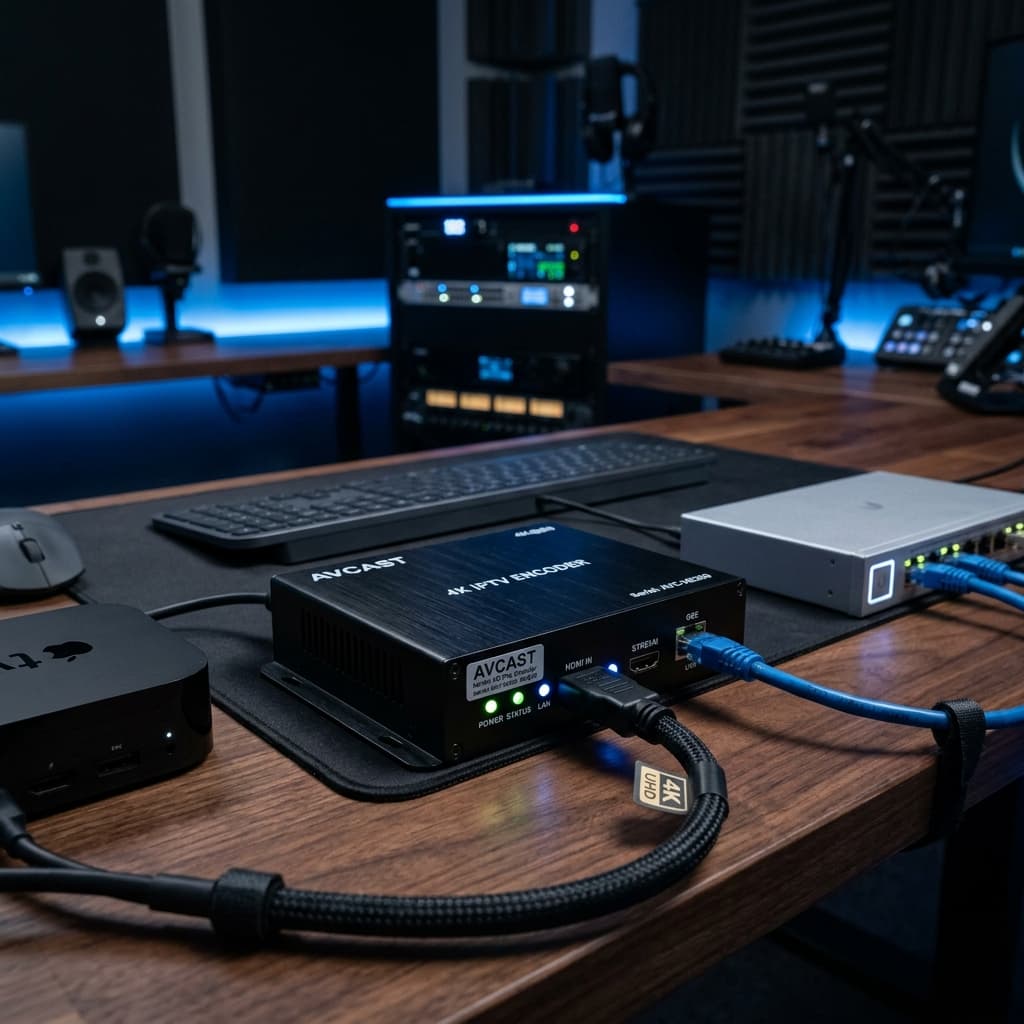
# Complete Guide to HDMI to IPTV Converter Technology for Seamless 4K Video Streaming in 2026
In the rapidly evolving landscape of modern video distribution and digital broadcasting, the demand for converting direct High Definition media signals into network streams has reached an all time high. An hdmi to iptv converter is a specialized hardware encoder device designed to capture uncompressed digital audio and video signals from an HDMI source and compress them into standardized IP network packets. Whether you operate a commercial hotel display system, a corporate office network, a sports bar broadcasting center, or a sophisticated home media network, using a dedicated hdmi to iptv converter allows you to stream live video content directly across local ethernet networks or over the internet. In this in depth guide, we explore the core principles of hdmi to iptv converter hardware, examine how network video encoding operates, outline key features to look for when buying a converter, provide a comprehensive step by step installation workflow, answer frequently asked technical questions, and demonstrate how to optimize your network infrastructure for flawless four K video transmission.
## What Is an HDMI to IPTV Converter and How Does It Function
An hdmi to iptv converter, also widely recognized as an HDMI to IP encoder or network video streamer, is an electronic appliance that bridges physical video hardware with internet protocol networks. Traditional video distribution requires running physical HDMI cables or coaxial lines directly from a video source such as a satellite receiver, gaming console, media player, camera, or computer to individual display screens. However, physical HDMI connections suffer from severe distance limitations and become extremely expensive when routing video across multiple rooms or buildings.
An hdmi to iptv converter solves this physical distance limitation by taking the raw uncompressed HDMI signal and processing it through a built in hardware digital signal processor. The internal processor compresses the heavy video stream using advanced video compression standards such as H264 or H265 HEVC. Once compressed, the converter encapsulates the video stream into standardized streaming network protocols including TS, RTSP, RTMP, UDP, HTTP, or HLS. The resulting stream is transmitted directly through a standard RJ45 ethernet port onto a local area network or wide area network. Any compatible media receiver, Smart TV app, set top box, or software media player connected to the network can then decode and display the video stream in real time.
## Major Advantages of Using an HDMI to IPTV Converter
Integrating an hdmi to iptv converter into your media system offers a wide array of practical, operational, and economic benefits over legacy cabling systems.
1. Unlimited Transmission Distance. Unlike standard physical video cables that experience signal degradation after ten meters, IP based video signals can travel across unlimited distances via local ethernet cables, fiber optic networks, or even secure global internet connections.
2. Massive Scalability for Multi Display Environments. A single hdmi to iptv converter can broadcast a single video stream to hundreds of connected television screens simultaneously using local network multicast protocol without reducing video clarity or requiring expensive distribution amplifiers.
3. Substantial Infrastructure Cost Savings. Utilizing existing ethernet network cabling and standard Gigabit network switches eliminates the need to install costly dedicated coaxial cables or HDMI extenders throughout your facility.
4. Flexible Stream Management and Remote Control. Modern hdmi to iptv converter devices feature intuitive web based administration interfaces accessible through any standard web browser. This allows network administrators to adjust encoding bitrates, change stream resolutions, manage security credentials, and monitor device health remotely.
5. High Compatibility Across Devices. The output streams generated by an hdmi to iptv converter can be easily received and played by a vast range of hardware and software solutions, including Smart TVs, IPTV set top boxes, VLC media player, mobile phones, tablets, and dedicated digital signage media players.
## Critical Hardware Specifications to Evaluate Before Purchasing
Selecting the optimal hdmi to iptv converter for your specific application requires careful evaluation of several important hardware parameters and technical capabilities.
First, examine the video compression standard supported by the hardware. While standard H264 encoding offers broad compatibility across older receiving devices, modern H265 HEVC encoding provides superior bandwidth efficiency, delivering pristine four K video quality while consuming up to fifty percent less network bandwidth.
Second, evaluate the supported video resolutions and frame rates. High end hdmi to iptv converter units support full 4K resolution at sixty frames per second, ensuring smooth motion rendering for fast paced sports broadcasts and high action media. Lower tier units may cap resolution at 1080p full high definition, which might be sufficient for basic digital signage but less desirable for premium home theater setups.
Third, check the available network streaming protocols. A versatile hdmi to iptv converter should support multiple industry standard protocols including UDP, RTP multicast, RTSP, RTMP, HLS, and SRT. Support for SRT is particularly valuable when transmitting streams over unpredictable public internet connections because it provides active packet recovery and ultralow latency.
Fourth, consider latency performance. For interactive applications, live sports broadcasting, or video presentation systems, selecting an hdmi to iptv converter with low latency hardware encoding is vital to prevent frustrating audio and video delays.
## Step by Step Installation and Configuration Guide
Setting up a new hdmi to iptv converter is a straightforward process that can be completed within a few simple steps. Follow this logical setup workflow to get your network stream running smoothly.
1. Connect your video source equipment, such as a media player, satellite receiver, or camera, to the HDMI input port of your hdmi to iptv converter using a high speed HDMI cable.
2. Connect a standard ethernet network cable from the RJ45 network port of the converter to your local network switch or router.
3. Connect the included power adapter to the converter device and plug it into a nearby electrical outlet to turn on the hardware.
4. Open a web browser on a computer connected to the same local network and enter the default IP address of the converter to access its web administration dashboard.
5. Log in using the default administrator credentials provided in the user manual and navigate to the network settings tab to assign a static IP address to your converter.
6. Navigate to the video encoding settings menu to configure your desired resolution, target bitrate, frame rate, and compression standard such as H264 or H265.
7. Select your preferred network streaming protocol, such as RTSP or UDP multicast, and note down the generated streaming URL address.
8. Open your preferred IPTV application or software media player on your Smart TV or computer, input the streaming URL address, and enjoy live, crystal clear network video.
## Frequently Asked Questions About HDMI to IPTV Converter Devices
Question one. What is the difference between an HDMI encoder and an hdmi to iptv converter.
Answer. An HDMI encoder and an hdmi to iptv converter refer to the exact same hardware technology. Both terms describe an electronic device that converts raw digital HDMI signals into compressed IP video streams for network distribution.
Question two. How much network bandwidth does an hdmi to iptv converter require.
Answer. The required network bandwidth depends directly on the chosen video resolution, frame rate, and compression standard. A standard 1080p stream using H264 compression typically consumes between four and eight megabits per second. A pristine 4K video stream using H265 compression typically requires between twelve and twenty five megabits per second.
Question three. Can I stream content from an hdmi to iptv converter to multiple televisions at the same time.
Answer. Yes, by enabling UDP multicast protocol on your hdmi to iptv converter and configuring your local network switch to support IGMP snooping, a single converter can stream content to an unlimited number of connected TVs simultaneously without increasing overall network load.
Question four. Why is there a delay between the original HDMI video source and the IPTV stream.
Answer. Processing delay, commonly known as latency, occurs naturally because the converter must buffer and compress incoming video frames before transmitting them over the network. High quality hardware encoders reduce this latency down to less than two hundred milliseconds.
Question five. Can an hdmi to iptv converter stream video directly over the internet.
Answer. Yes, many modern converters support protocols like RTMP and SRT, allowing you to stream video directly to remote servers, content delivery networks, or private remote display screens across the globe.
## Conclusion and Final Recommendations
Investing in a high quality hdmi to iptv converter is the most effective way to modernize your video distribution system in 2026. By converting physical HDMI signals into highly efficient network IP streams, you unlock unlimited transmission distance, effortless multi screen distribution, and substantial cost savings on video cabling. Pair your hardware setup with high performance streaming services like Eagle4k for an unmatched four K viewing experience. Configure your device today and take complete control of your digital media distribution network.
In the rapidly evolving landscape of modern video distribution and digital broadcasting, the demand for converting direct High Definition media signals into network streams has reached an all time high. An hdmi to iptv converter is a specialized hardware encoder device designed to capture uncompressed digital audio and video signals from an HDMI source and compress them into standardized IP network packets. Whether you operate a commercial hotel display system, a corporate office network, a sports bar broadcasting center, or a sophisticated home media network, using a dedicated hdmi to iptv converter allows you to stream live video content directly across local ethernet networks or over the internet. In this in depth guide, we explore the core principles of hdmi to iptv converter hardware, examine how network video encoding operates, outline key features to look for when buying a converter, provide a comprehensive step by step installation workflow, answer frequently asked technical questions, and demonstrate how to optimize your network infrastructure for flawless four K video transmission.
## What Is an HDMI to IPTV Converter and How Does It Function
An hdmi to iptv converter, also widely recognized as an HDMI to IP encoder or network video streamer, is an electronic appliance that bridges physical video hardware with internet protocol networks. Traditional video distribution requires running physical HDMI cables or coaxial lines directly from a video source such as a satellite receiver, gaming console, media player, camera, or computer to individual display screens. However, physical HDMI connections suffer from severe distance limitations and become extremely expensive when routing video across multiple rooms or buildings.
An hdmi to iptv converter solves this physical distance limitation by taking the raw uncompressed HDMI signal and processing it through a built in hardware digital signal processor. The internal processor compresses the heavy video stream using advanced video compression standards such as H264 or H265 HEVC. Once compressed, the converter encapsulates the video stream into standardized streaming network protocols including TS, RTSP, RTMP, UDP, HTTP, or HLS. The resulting stream is transmitted directly through a standard RJ45 ethernet port onto a local area network or wide area network. Any compatible media receiver, Smart TV app, set top box, or software media player connected to the network can then decode and display the video stream in real time.
## Major Advantages of Using an HDMI to IPTV Converter
Integrating an hdmi to iptv converter into your media system offers a wide array of practical, operational, and economic benefits over legacy cabling systems.
1. Unlimited Transmission Distance. Unlike standard physical video cables that experience signal degradation after ten meters, IP based video signals can travel across unlimited distances via local ethernet cables, fiber optic networks, or even secure global internet connections.
2. Massive Scalability for Multi Display Environments. A single hdmi to iptv converter can broadcast a single video stream to hundreds of connected television screens simultaneously using local network multicast protocol without reducing video clarity or requiring expensive distribution amplifiers.
3. Substantial Infrastructure Cost Savings. Utilizing existing ethernet network cabling and standard Gigabit network switches eliminates the need to install costly dedicated coaxial cables or HDMI extenders throughout your facility.
4. Flexible Stream Management and Remote Control. Modern hdmi to iptv converter devices feature intuitive web based administration interfaces accessible through any standard web browser. This allows network administrators to adjust encoding bitrates, change stream resolutions, manage security credentials, and monitor device health remotely.
5. High Compatibility Across Devices. The output streams generated by an hdmi to iptv converter can be easily received and played by a vast range of hardware and software solutions, including Smart TVs, IPTV set top boxes, VLC media player, mobile phones, tablets, and dedicated digital signage media players.
## Critical Hardware Specifications to Evaluate Before Purchasing
Selecting the optimal hdmi to iptv converter for your specific application requires careful evaluation of several important hardware parameters and technical capabilities.
First, examine the video compression standard supported by the hardware. While standard H264 encoding offers broad compatibility across older receiving devices, modern H265 HEVC encoding provides superior bandwidth efficiency, delivering pristine four K video quality while consuming up to fifty percent less network bandwidth.
Second, evaluate the supported video resolutions and frame rates. High end hdmi to iptv converter units support full 4K resolution at sixty frames per second, ensuring smooth motion rendering for fast paced sports broadcasts and high action media. Lower tier units may cap resolution at 1080p full high definition, which might be sufficient for basic digital signage but less desirable for premium home theater setups.
Third, check the available network streaming protocols. A versatile hdmi to iptv converter should support multiple industry standard protocols including UDP, RTP multicast, RTSP, RTMP, HLS, and SRT. Support for SRT is particularly valuable when transmitting streams over unpredictable public internet connections because it provides active packet recovery and ultralow latency.
Fourth, consider latency performance. For interactive applications, live sports broadcasting, or video presentation systems, selecting an hdmi to iptv converter with low latency hardware encoding is vital to prevent frustrating audio and video delays.
## Step by Step Installation and Configuration Guide
Setting up a new hdmi to iptv converter is a straightforward process that can be completed within a few simple steps. Follow this logical setup workflow to get your network stream running smoothly.
1. Connect your video source equipment, such as a media player, satellite receiver, or camera, to the HDMI input port of your hdmi to iptv converter using a high speed HDMI cable.
2. Connect a standard ethernet network cable from the RJ45 network port of the converter to your local network switch or router.
3. Connect the included power adapter to the converter device and plug it into a nearby electrical outlet to turn on the hardware.
4. Open a web browser on a computer connected to the same local network and enter the default IP address of the converter to access its web administration dashboard.
5. Log in using the default administrator credentials provided in the user manual and navigate to the network settings tab to assign a static IP address to your converter.
6. Navigate to the video encoding settings menu to configure your desired resolution, target bitrate, frame rate, and compression standard such as H264 or H265.
7. Select your preferred network streaming protocol, such as RTSP or UDP multicast, and note down the generated streaming URL address.
8. Open your preferred IPTV application or software media player on your Smart TV or computer, input the streaming URL address, and enjoy live, crystal clear network video.
## Frequently Asked Questions About HDMI to IPTV Converter Devices
Question one. What is the difference between an HDMI encoder and an hdmi to iptv converter.
Answer. An HDMI encoder and an hdmi to iptv converter refer to the exact same hardware technology. Both terms describe an electronic device that converts raw digital HDMI signals into compressed IP video streams for network distribution.
Question two. How much network bandwidth does an hdmi to iptv converter require.
Answer. The required network bandwidth depends directly on the chosen video resolution, frame rate, and compression standard. A standard 1080p stream using H264 compression typically consumes between four and eight megabits per second. A pristine 4K video stream using H265 compression typically requires between twelve and twenty five megabits per second.
Question three. Can I stream content from an hdmi to iptv converter to multiple televisions at the same time.
Answer. Yes, by enabling UDP multicast protocol on your hdmi to iptv converter and configuring your local network switch to support IGMP snooping, a single converter can stream content to an unlimited number of connected TVs simultaneously without increasing overall network load.
Question four. Why is there a delay between the original HDMI video source and the IPTV stream.
Answer. Processing delay, commonly known as latency, occurs naturally because the converter must buffer and compress incoming video frames before transmitting them over the network. High quality hardware encoders reduce this latency down to less than two hundred milliseconds.
Question five. Can an hdmi to iptv converter stream video directly over the internet.
Answer. Yes, many modern converters support protocols like RTMP and SRT, allowing you to stream video directly to remote servers, content delivery networks, or private remote display screens across the globe.
## Conclusion and Final Recommendations
Investing in a high quality hdmi to iptv converter is the most effective way to modernize your video distribution system in 2026. By converting physical HDMI signals into highly efficient network IP streams, you unlock unlimited transmission distance, effortless multi screen distribution, and substantial cost savings on video cabling. Pair your hardware setup with high performance streaming services like Eagle4k for an unmatched four K viewing experience. Configure your device today and take complete control of your digital media distribution network.