
# Technical Evaluation of HEVC HDMI IPTV Encoder Hardware for Efficient Ultra High Definition Video Delivery
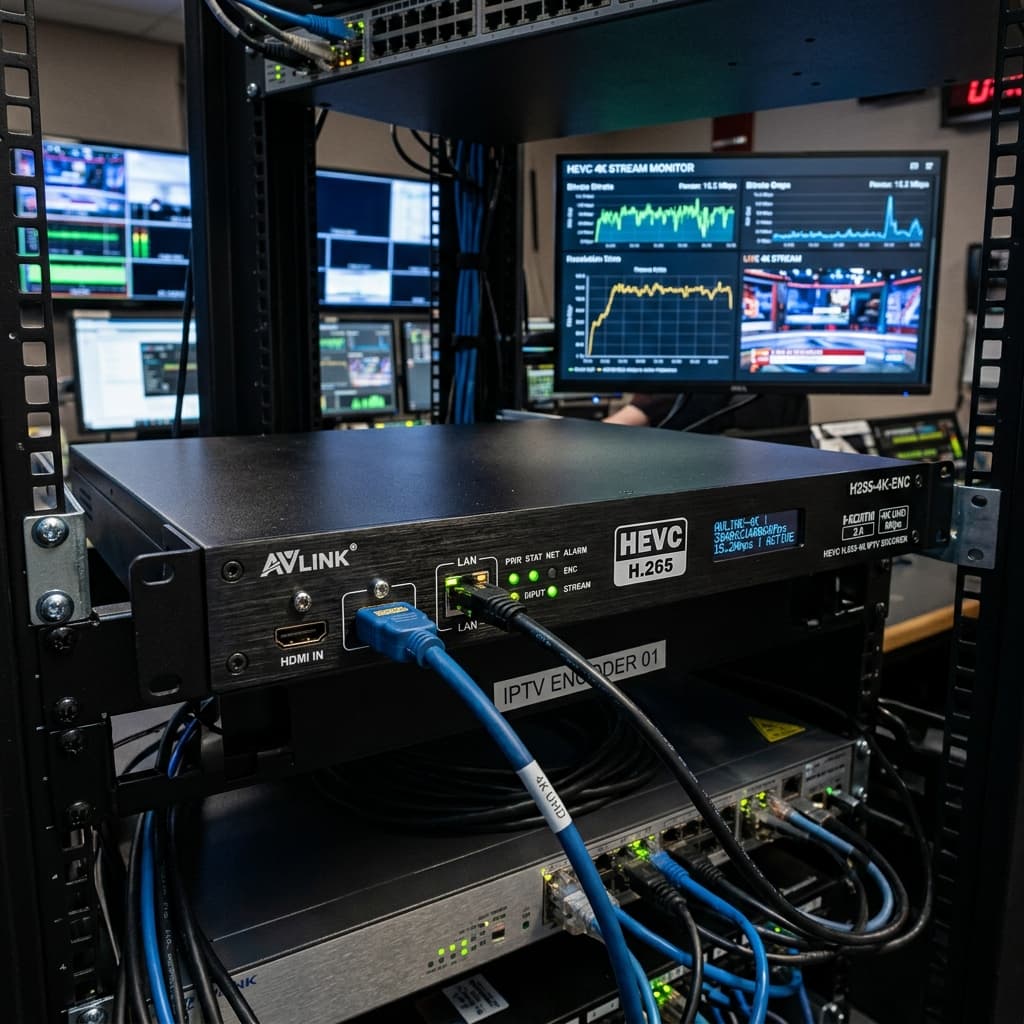
In modern digital video networks, corporate broadcast environments, educational media centers, and commercial venue setups, streaming high resolution video feeds efficiently over local network switches requires advanced hardware compression technology. A dedicated hevc hdmi iptv encoder is a specialized physical hardware appliance engineered to capture raw uncompressed 4K or High Definition video and digital audio from an HDMI input source, compress the stream using High Efficiency Video Coding H265 algorithms, and transmit IP data packets across standard ethernet networks. Implementing a professional hevc hdmi iptv encoder allows network engineers to reduce required bandwidth by up to fifty percent compared to older H264 hardware encoders while maintaining pristine four K video quality at sixty frames per second. In this detailed educational resource, we explore how hevc hdmi iptv encoder hardware functions, examine core technical specifications, detail step by step setup workflows, answer common system engineering questions, and explain why pairing hardware encoders with cloud edge networks like Eagle4k guarantees ultimate streaming performance.
## Understanding the Core Architecture Behind HEVC HDMI IPTV Encoder Systems
To evaluate what differentiates HEVC compression from older standards, it is helpful to analyze how an hevc hdmi iptv encoder converts physical media signals into internet protocol packets. Traditional video setups require running direct HDMI cables from media sources like satellite receivers, digital switchers, gaming consoles, or computers to display monitors. However, physical HDMI signals degrade significantly over long cable distances and become impractical when routing video to dozens of screens across large facilities.
An hevc hdmi iptv encoder solves these physical limitations by ingesting uncompressed digital video through its physical HDMI input port. Inside the appliance, dedicated hardware digital signal processors compress incoming video frames using High Efficiency Video Coding H265 algorithms, utilizing larger coding tree units and advanced motion compensation to preserve visual detail at lower bitrates. Once compressed, onboard networking hardware encapsulates media frames into standardized streaming transport protocols including UDP multicast, RTP, RTSP, RTMP, HLS, or SRT. The encoder outputs these IP packets via a standard RJ45 Gigabit ethernet interface onto local facility network switches. Any compatible Smart TV application, set top box decoder, or cloud server connected to the network can then decode and render the live stream in real time.
## Essential Features and Technical Parameters of an HEVC HDMI IPTV Encoder
Selecting the optimal hevc hdmi iptv encoder requires evaluating several vital hardware parameters and engineering features. Here are the core specifications associated with professional units.
1. Advanced H265 HEVC Hardware Compression. The primary feature of an hevc hdmi iptv encoder is its dedicated H265 silicon encoding engine, delivering crisp four K video quality while consuming up to fifty percent less network bandwidth than legacy H264 hardware encoders.
2. Full 4K Resolution at Sixty Frames Per Second. Premium hevc hdmi iptv encoder models support full 3840 by 2160 resolution at sixty frames per second, ensuring fluid motion rendering for high action sports broadcasts and fast moving digital signage content.
3. Multi Protocol Simultaneous Streaming Output. A versatile hevc hdmi iptv encoder can push live video streams over multiple IP transport protocols concurrently, broadcasting UDP multicast to local facility screens while pushing RTMP or SRT feeds to remote cloud distribution servers.
4. Pass Through HDMI Loop Output. Hardware units feature a physical HDMI loop through output port, allowing engineers to connect a local reference monitor directly at the encoder source location without installing external HDMI signal splitters.
5. Low Latency Hardware Architecture. Industrial encoder appliances utilize specialized field programmable gate arrays to achieve ultralow encoding latency under one hundred fifty milliseconds, vital for real time broadcast monitoring and interactive live event streaming.
## Analyzing Network Performance and Anti Freeze Reliability
Hardware encoding reliability represents the ultimate benchmark when deploying an hevc hdmi iptv encoder into commercial broadcasting, corporate media networks, or enterprise IPTV distribution. Video freezing, frame stuttering, and audio desynchronization severely compromise viewer satisfaction during high traffic broadcast events.
When streaming high bitrate four K media across local area networks or public internet links, managing network jitter and bandwidth allocation is essential. Enterprise hardware encoders combine constant bitrate algorithms with Anti Freeze version nine software engineering to balance traffic throughput automatically. This intelligent data management prevents stream freezes and video corruption when hundreds of receiving decoders request the stream simultaneously. When connecting your hardware encoder output to high availability cloud infrastructure like Eagle4k, operating six global edge server clusters guarantees ninety nine point ninety nine percent server uptime and silky smooth four K video playback.
## Step by Step Setup Instructions for an HEVC HDMI IPTV Encoder
Configuring a new hevc hdmi iptv encoder inside your equipment rack is a straightforward technical process that takes under five minutes. Follow these logical steps to initialize your broadcast network stream.
1. Securely mount your hevc hdmi iptv encoder into an equipment rack shelf or place it on a well ventilated surface near your video source equipment.
2. Connect a high speed HDMI cable from your video source device to the physical HDMI input port on the encoder appliance.
3. Optional step. Connect an HDMI loop output cable from the encoder chassis directly to a local reference display monitor.
4. Connect a CAT6 ethernet cable from the encoder RJ45 Gigabit network port to your managed network switch or router.
5. Connect the power adapter to an electrical outlet to initialize the encoder hardware firmware.
6. Open a web browser on a workstation connected to the same network subnet and enter the default IP address of the encoder to open the administration interface.
7. Navigate to network settings to assign static IP addresses, subnet masks, and network gateway parameters.
8. Navigate to encoding options to select your desired resolution, frame rate, target bitrate, H265 HEVC compression format, and transport protocols like RTSP or UDP multicast, then save settings to begin broadcasting.
## Frequently Asked Questions About HEVC HDMI IPTV Encoder Hardware
Question one. What is the main advantage of choosing an hevc hdmi iptv encoder over an H264 encoder.
Answer. An hevc hdmi iptv encoder utilizes H265 HEVC compression, which delivers the exact same four K video quality as older H264 encoders while consuming up to fifty percent less network bandwidth.
Question two. How much network bandwidth does an hevc hdmi iptv encoder require for streaming.
Answer. A high quality 4K video stream compressed with H265 HEVC typically consumes between twelve and twenty five megabits per second, compared to twenty five to fifty megabits per second for H264 encoding.
Question three. Can an hevc hdmi iptv encoder stream live video over the internet.
Answer. Yes, modern hevc hdmi iptv encoder appliances support internet streaming protocols such as SRT and RTMP, allowing you to stream video directly to remote cloud servers, social platforms, or private media distribution networks.
Question four. Are all Smart TVs and IPTV set top boxes compatible with HEVC streams.
Answer. Most modern Smart TVs, Android TV boxes, Firestick devices, and IPTV receivers feature native hardware H265 decoding, ensuring seamless playback of streams produced by an hevc hdmi iptv encoder.
Question five. Can an hevc hdmi iptv encoder work alongside Eagle4k streaming servers.
Answer. Yes, an hevc hdmi iptv encoder can ingest video from local production equipment and stream it into network infrastructure compatible with commercial IPTV platforms and Eagle4k edge servers.
## Summary and Final System Recommendations
In summary, installing a professional hevc hdmi iptv encoder is the most reliable decision for facility managers, broadcast engineers, and media network administrators seeking robust four K video distribution. By converting physical HDMI signals into bandwidth efficient H265 IP network streams using dedicated hardware processing, an hevc hdmi iptv encoder provides unlimited transmission distance, multi screen scalability, and ultralow latency performance. Pairing your hardware encoder infrastructure with high availability cloud networks like Eagle4k ensures pristine four K video delivery across all connected subscriber screens. Configure your network encoder today and empower your digital media infrastructure.
In modern digital video networks, corporate broadcast environments, educational media centers, and commercial venue setups, streaming high resolution video feeds efficiently over local network switches requires advanced hardware compression technology. A dedicated hevc hdmi iptv encoder is a specialized physical hardware appliance engineered to capture raw uncompressed 4K or High Definition video and digital audio from an HDMI input source, compress the stream using High Efficiency Video Coding H265 algorithms, and transmit IP data packets across standard ethernet networks. Implementing a professional hevc hdmi iptv encoder allows network engineers to reduce required bandwidth by up to fifty percent compared to older H264 hardware encoders while maintaining pristine four K video quality at sixty frames per second. In this detailed educational resource, we explore how hevc hdmi iptv encoder hardware functions, examine core technical specifications, detail step by step setup workflows, answer common system engineering questions, and explain why pairing hardware encoders with cloud edge networks like Eagle4k guarantees ultimate streaming performance.
## Understanding the Core Architecture Behind HEVC HDMI IPTV Encoder Systems
To evaluate what differentiates HEVC compression from older standards, it is helpful to analyze how an hevc hdmi iptv encoder converts physical media signals into internet protocol packets. Traditional video setups require running direct HDMI cables from media sources like satellite receivers, digital switchers, gaming consoles, or computers to display monitors. However, physical HDMI signals degrade significantly over long cable distances and become impractical when routing video to dozens of screens across large facilities.
An hevc hdmi iptv encoder solves these physical limitations by ingesting uncompressed digital video through its physical HDMI input port. Inside the appliance, dedicated hardware digital signal processors compress incoming video frames using High Efficiency Video Coding H265 algorithms, utilizing larger coding tree units and advanced motion compensation to preserve visual detail at lower bitrates. Once compressed, onboard networking hardware encapsulates media frames into standardized streaming transport protocols including UDP multicast, RTP, RTSP, RTMP, HLS, or SRT. The encoder outputs these IP packets via a standard RJ45 Gigabit ethernet interface onto local facility network switches. Any compatible Smart TV application, set top box decoder, or cloud server connected to the network can then decode and render the live stream in real time.
## Essential Features and Technical Parameters of an HEVC HDMI IPTV Encoder
Selecting the optimal hevc hdmi iptv encoder requires evaluating several vital hardware parameters and engineering features. Here are the core specifications associated with professional units.
1. Advanced H265 HEVC Hardware Compression. The primary feature of an hevc hdmi iptv encoder is its dedicated H265 silicon encoding engine, delivering crisp four K video quality while consuming up to fifty percent less network bandwidth than legacy H264 hardware encoders.
2. Full 4K Resolution at Sixty Frames Per Second. Premium hevc hdmi iptv encoder models support full 3840 by 2160 resolution at sixty frames per second, ensuring fluid motion rendering for high action sports broadcasts and fast moving digital signage content.
3. Multi Protocol Simultaneous Streaming Output. A versatile hevc hdmi iptv encoder can push live video streams over multiple IP transport protocols concurrently, broadcasting UDP multicast to local facility screens while pushing RTMP or SRT feeds to remote cloud distribution servers.
4. Pass Through HDMI Loop Output. Hardware units feature a physical HDMI loop through output port, allowing engineers to connect a local reference monitor directly at the encoder source location without installing external HDMI signal splitters.
5. Low Latency Hardware Architecture. Industrial encoder appliances utilize specialized field programmable gate arrays to achieve ultralow encoding latency under one hundred fifty milliseconds, vital for real time broadcast monitoring and interactive live event streaming.
## Analyzing Network Performance and Anti Freeze Reliability
Hardware encoding reliability represents the ultimate benchmark when deploying an hevc hdmi iptv encoder into commercial broadcasting, corporate media networks, or enterprise IPTV distribution. Video freezing, frame stuttering, and audio desynchronization severely compromise viewer satisfaction during high traffic broadcast events.
When streaming high bitrate four K media across local area networks or public internet links, managing network jitter and bandwidth allocation is essential. Enterprise hardware encoders combine constant bitrate algorithms with Anti Freeze version nine software engineering to balance traffic throughput automatically. This intelligent data management prevents stream freezes and video corruption when hundreds of receiving decoders request the stream simultaneously. When connecting your hardware encoder output to high availability cloud infrastructure like Eagle4k, operating six global edge server clusters guarantees ninety nine point ninety nine percent server uptime and silky smooth four K video playback.
## Step by Step Setup Instructions for an HEVC HDMI IPTV Encoder
Configuring a new hevc hdmi iptv encoder inside your equipment rack is a straightforward technical process that takes under five minutes. Follow these logical steps to initialize your broadcast network stream.
1. Securely mount your hevc hdmi iptv encoder into an equipment rack shelf or place it on a well ventilated surface near your video source equipment.
2. Connect a high speed HDMI cable from your video source device to the physical HDMI input port on the encoder appliance.
3. Optional step. Connect an HDMI loop output cable from the encoder chassis directly to a local reference display monitor.
4. Connect a CAT6 ethernet cable from the encoder RJ45 Gigabit network port to your managed network switch or router.
5. Connect the power adapter to an electrical outlet to initialize the encoder hardware firmware.
6. Open a web browser on a workstation connected to the same network subnet and enter the default IP address of the encoder to open the administration interface.
7. Navigate to network settings to assign static IP addresses, subnet masks, and network gateway parameters.
8. Navigate to encoding options to select your desired resolution, frame rate, target bitrate, H265 HEVC compression format, and transport protocols like RTSP or UDP multicast, then save settings to begin broadcasting.
## Frequently Asked Questions About HEVC HDMI IPTV Encoder Hardware
Question one. What is the main advantage of choosing an hevc hdmi iptv encoder over an H264 encoder.
Answer. An hevc hdmi iptv encoder utilizes H265 HEVC compression, which delivers the exact same four K video quality as older H264 encoders while consuming up to fifty percent less network bandwidth.
Question two. How much network bandwidth does an hevc hdmi iptv encoder require for streaming.
Answer. A high quality 4K video stream compressed with H265 HEVC typically consumes between twelve and twenty five megabits per second, compared to twenty five to fifty megabits per second for H264 encoding.
Question three. Can an hevc hdmi iptv encoder stream live video over the internet.
Answer. Yes, modern hevc hdmi iptv encoder appliances support internet streaming protocols such as SRT and RTMP, allowing you to stream video directly to remote cloud servers, social platforms, or private media distribution networks.
Question four. Are all Smart TVs and IPTV set top boxes compatible with HEVC streams.
Answer. Most modern Smart TVs, Android TV boxes, Firestick devices, and IPTV receivers feature native hardware H265 decoding, ensuring seamless playback of streams produced by an hevc hdmi iptv encoder.
Question five. Can an hevc hdmi iptv encoder work alongside Eagle4k streaming servers.
Answer. Yes, an hevc hdmi iptv encoder can ingest video from local production equipment and stream it into network infrastructure compatible with commercial IPTV platforms and Eagle4k edge servers.
## Summary and Final System Recommendations
In summary, installing a professional hevc hdmi iptv encoder is the most reliable decision for facility managers, broadcast engineers, and media network administrators seeking robust four K video distribution. By converting physical HDMI signals into bandwidth efficient H265 IP network streams using dedicated hardware processing, an hevc hdmi iptv encoder provides unlimited transmission distance, multi screen scalability, and ultralow latency performance. Pairing your hardware encoder infrastructure with high availability cloud networks like Eagle4k ensures pristine four K video delivery across all connected subscriber screens. Configure your network encoder today and empower your digital media infrastructure.